Virtueinfo
All example websites

Yoga and Pilates studio · Helsinki

Website for a yoga studio

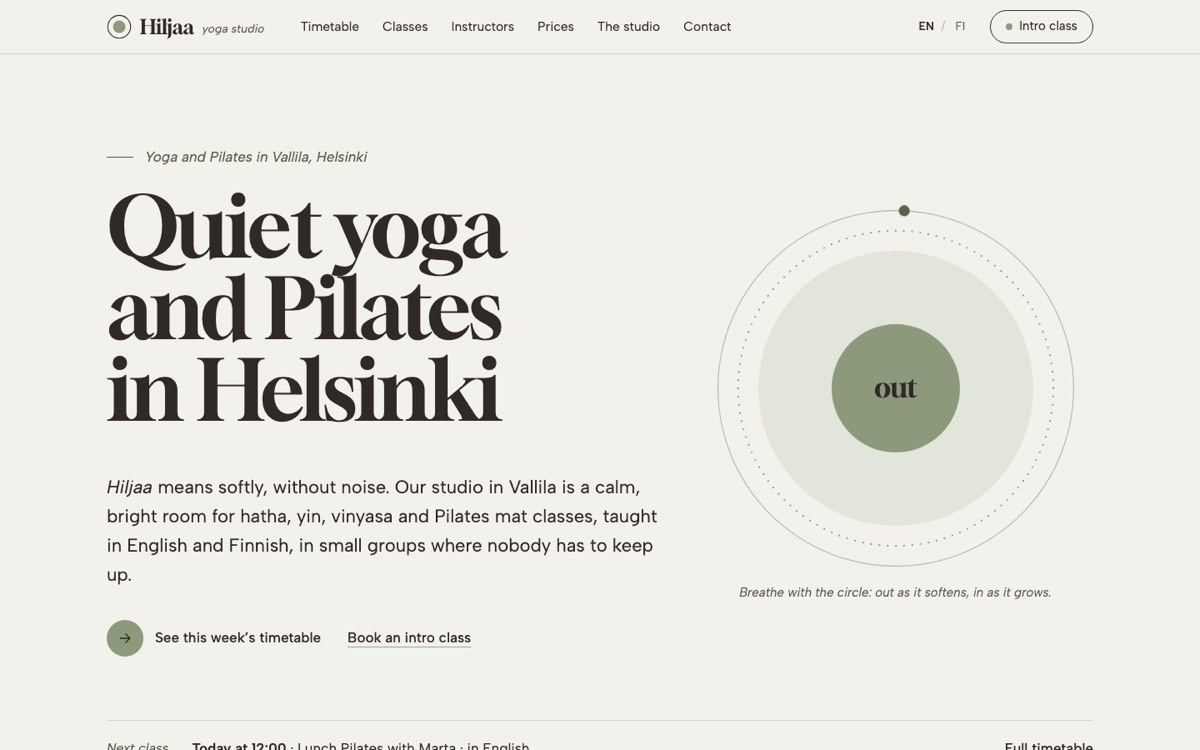
Hiljaa Yoga Studio is a bilingual website for a small yoga and Pilates studio in Vallila, Helsinki, built around a timetable that filters by style, level and class language. The studio is fictional: Virtueinfo made it to show what we build.

In the call we show you the working demo and how it would look for your business.

Desktop view of the example website for a yoga and pilates studio
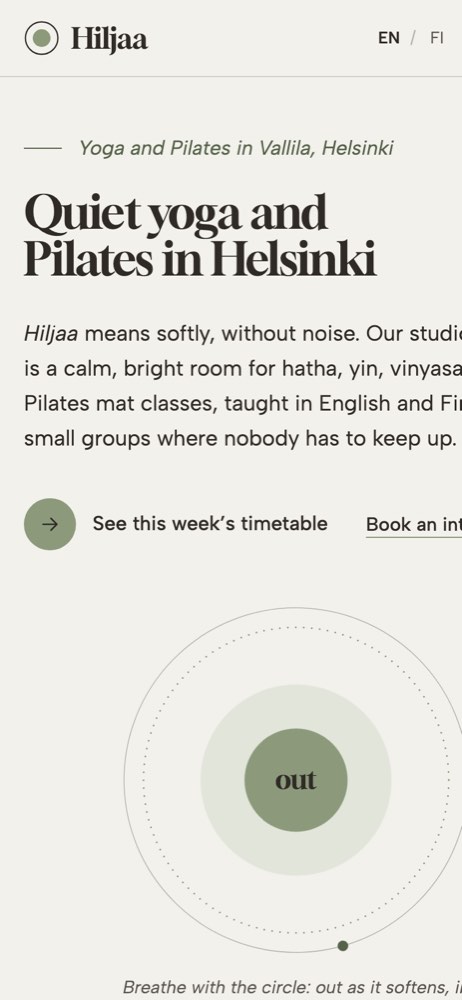
Phone view of the example website for a yoga and pilates studio

Hiljaa Yoga Studio is a fictional business in Helsinki, created by Virtueinfo to show what we build.

What yoga students look for before the first class

A beginner with a stiff back wants to know which class to start with, whether they need to be flexible, what to bring and what the first visit costs. A regular who is switching studios compares the timetable by style and level, looks at the teachers and works out whether a class card or a monthly pass is cheaper.

In a city like Helsinki there is a third group: international residents who need classes in English. They want to see the class language in the timetable before they book, and some want to move into Finnish classes over time.

All three end up on the timetable, so it has to answer their questions without making them read every row.

How the Hiljaa demo does it

The timetable shows the whole week as a grid, with filters for style, level and language. Each filter updates the list at once, shows how many classes match, and leaves a short note on days with no matching class. The choices are kept in the page address, so a link sent to a friend opens the same filtered view. On a phone the grid becomes a day picker that opens on today, worked out in Helsinki time, and the home page shows the next class from the same timetable.

Every class has a Try this class link that opens the intro class form with that class already selected. The form asks for preferred times, experience and class language, and keeps the note about injuries short and optional. Teacher profiles link back to the timetable filtered to that teacher.

On the prices page a pass finder asks how often you expect to come and whether you get the student or senior rate, then names the option that costs least and shows the comparison.

What we would set up for your studio

For a real studio we build the site in Finnish and English, or add Swedish, with each page linked to its other language version. We set up your Google Business Profile and write the class and studio pages for local searches such as yoga plus your district.

The timetable can read from the booking system you already use, so classes, cancellations and free places stay in one place, and enquiries go to your email or CRM. Analytics load only after the visitor consents, the filters and forms work with a keyboard and a screen reader, and after launch we keep the software, prices and teacher pages up to date.
Who builds your website

Virtueinfo has built web and mobile software since 2004. The team that made this demo designs, builds and maintains your site.

“We have worked with Virtueinfo for the past seven years. They have been reliable and efficient with their work, helping us along the way by being an agile and responsive development house. The know-how has ranged from front to back-end development and quality has always met our standards. Warm recommendation.”
Tuomas Talola
Reviews on Clutch
  • You own everything

    All code, content and accounts are yours from the first day.

  • Confidential from the start

    We sign an NDA before we see anything about your business.

  • A real estimate, free

    Scoping costs nothing and ends with a written estimate.

  • A reply within 1–2 business days

    Every enquiry gets a personal reply with next steps.

How the project runs

  1. 1

    First call. We go through your services, your customers and what the website needs to achieve.

  2. 2

    Plan and quote. You receive a page map, a list of features and a fixed quote.

  3. 3

    Design and build. You see the site as it takes shape and comment directly on the pages.

  4. 4

    Launch and care. We publish the site, redirect old addresses and keep it updated afterwards.

Questions we often hear

Can the timetable come from our booking system?

Yes, if the booking system offers a way to read the class list, which most do. The site then shows the same classes, times and teachers as your booking app, and the filters work on that data. If it does not, we build a simple editor for the timetable instead.

Do we need classes in English to use a bilingual site?

No. A bilingual site helps international residents find you even if most classes are in Finnish. The demo marks each class with its language, so visitors know before they book.

Can students book and pay on the website?

The demo sends an intro class enquiry and does not take payments. On your site the Try this class link can go straight to the booking and payment step in your booking system, or to an online shop for class cards and passes.

Want a website like this for your business?

Book a free call. We go through what you need and send a proposal with a quote.